

Security for the people who hold the keys.
In property management, data security starts with who can see what: a resident’s phone number, an owner’s balance, the board-only folder. Here is what we can verify today, what the product shows, and what we cover in a security review.
- Caller ID matched to unit 1102
- One-time code texted to the number on file
- Code confirmed: owner, unit 1102
- Balance read back, secure payment link texted
- Other units' details
- Who lives where
- Card numbers by voice
- Board-only records
What we can verify today
Facts about this website, the demo line and the providers behind the AI concierge. Your deployment’s controls are covered line by line in a security review.
What the review covers Download or print the security overview- Voice AI provider
- A hosted voice AI platform that processes calls and keeps their recordings and transcripts. Named in the security review.
- Telephony and SMS
- A telephony and SMS provider for numbers, calls, texts and SMS verification
- Website transport
- HTTPS only, with HSTS (two years, subdomains included)
- Website hardening
- Content-Security-Policy, frame blocking (X-Frame-Options: DENY), MIME sniffing blocked, strict referrer policy, microphone limited to our own pages
- Payments on the website
- None. The website takes no payments.
- Certifications
- None claimed.
- Demo requests
- The form has a bot trap and a rate limit. Its code saves each request to a database, emails it to us through an email delivery provider, or both, and confirms a request only after one of them accepts it. Which of the two is switched on for this site is confirmed at launch.
- Demo-line access (when enabled)
- A human-verification check, then a one-time SMS code sent through our telephony provider (US and Canada numbers). Verification starts a 30-minute session whose token is signed but not encrypted; it carries a truncated SHA-256 hash of the number, used to rate-limit calls per number. The AI concierge's number is shown only after verification and never appears in the page source. Browser calls are rate-limited per verified number and per IP address.
The public demo line is not open yet. The demo-line row describes how access works when it is switched on.
Who did what, and when, on one timeline.
Calls, check-ins, packages, approvals and sign-ins land on one timeline in the product, with the person, the role, the unit and the device. When an owner says nobody called back, or a director asks who opened a file, the answer is a search.
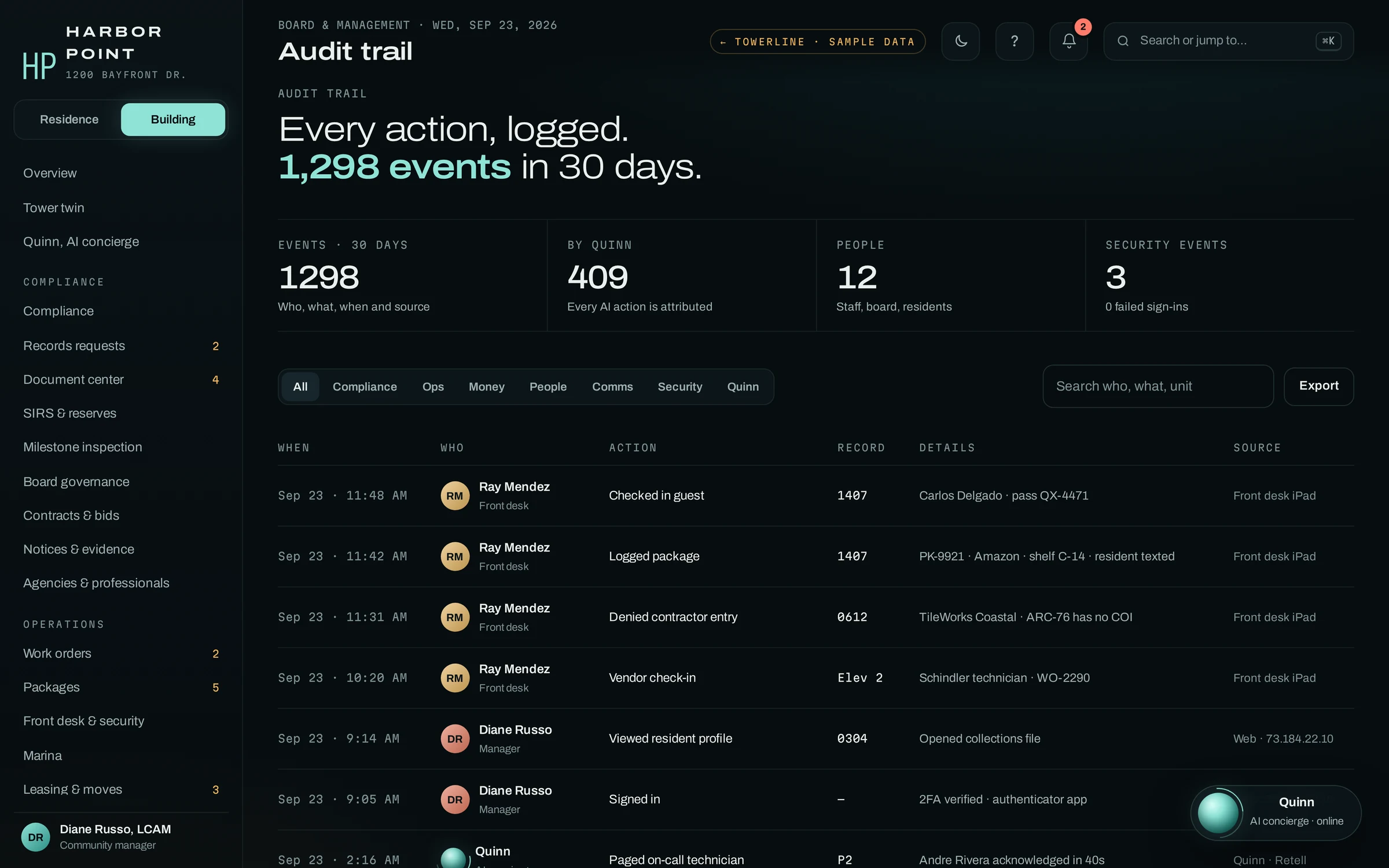
People and the AI concierge, side by side
Each entry names the person or the AI concierge, the role and the time, so what the concierge did is never filed under a staff member’s name.
Access changes included
Adding someone to the board or suspending a login is an entry like any other.
Filter, search, export
Filter by area, search by person, action or unit, and export what you find.
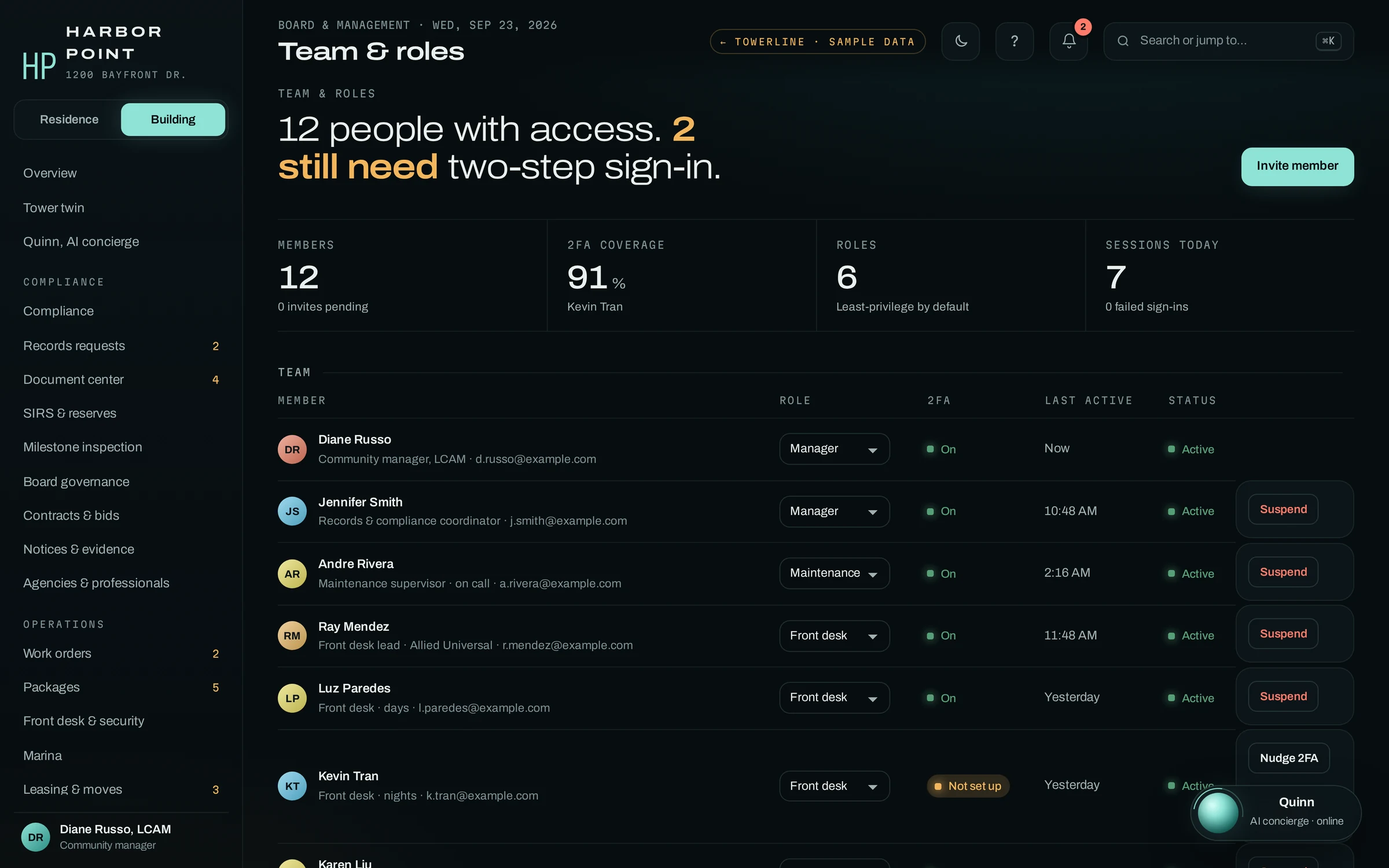
Every login has a name, a role and a sign-in status.
Staff access is managed per person. The manager sees who has access, which role each person holds, when they were last active and whether two-step sign-in is set up, and can suspend a login from the same screen.
- RolesManager, maintenance, front desk and the other staff roles, one per person
- Two-step sign-inStatus shown for every member, with a nudge for anyone not set up
- SuspendAccess removed from the same row, and the change logged
- Board and ownersSign in to their own portals with their own permissions
Who can see what, by role
An example configuration. Owners, the board and five staff roles, plus the AI concierge, whose access is limited to the caller on the line. Every cell is agreed per community during implementation.
| Data | Owner | Board | Front desk | AI concierge | Maintenance | Accountant | Manager |
|---|---|---|---|---|---|---|---|
| Work orders | Own unit | Summary | Full | Caller's unit | Assigned | None | Full |
| Resident phone and email | Own unit | None | Full | Caller's unit | Assigned | None | Full |
| Balances and payment status | Own unit | Summary | None | Verified caller | None | Full | Full |
| Owner-only documents | Full | Full | None | Points to them | None | None | Full |
| Board-only folder | None | Full | None | None | None | None | Full |
| Vendor contracts and insurance | None | Full | Summary | None | None | Full | Full |
| Audit trail and role changes | None | Summary | None | None | None | None | Full |
- Work orders Own unit
- Resident phone and email Own unit
- Balances and payment status Own unit
- Owner-only documents Full
Board-only folder, Vendor contracts and insurance, Audit trail and role changes
- Work orders Summary
- Balances and payment status Summary
- Owner-only documents Full
- Board-only folder Full
- Vendor contracts and insurance Full
- Audit trail and role changes Summary
Resident phone and email
- Work orders Full
- Resident phone and email Full
- Vendor contracts and insurance Summary
Balances and payment status, Owner-only documents, Board-only folder, Audit trail and role changes
- Work orders Caller's unit
- Resident phone and email Caller's unit
- Balances and payment status Verified caller
- Owner-only documents Points to them
Board-only folder, Vendor contracts and insurance, Audit trail and role changes
- Work orders Assigned
- Resident phone and email Assigned
Balances and payment status, Owner-only documents, Board-only folder, Vendor contracts and insurance, Audit trail and role changes
- Balances and payment status Full
- Vendor contracts and insurance Full
Work orders, Resident phone and email, Owner-only documents, Board-only folder, Audit trail and role changes
- Work orders Full
- Resident phone and email Full
- Balances and payment status Full
- Owner-only documents Full
- Board-only folder Full
- Vendor contracts and insurance Full
- Audit trail and role changes Full
- Full
- every record of this type
- Own unit
- only records for their own unit
- Assigned
- only the jobs assigned to them
- Summary
- totals and status, without personal details
- None
- no access
- Owner areas stay owner-only. In the product, documents posted for owners are hidden from tenants, vendors and the public.
- Owner view leaves out personal details. Florida, for example, lists phone numbers, email addresses and similar identifiers among association records owners cannot inspect (F.S. 718.111(12)(c)). General information, not legal advice.
- Vendor access is scoped with you. Contractor and vendor access is set up during implementation, starting from the job they are assigned.
Nothing about a unit until the caller is verified.
An owner calls about their October balance. The AI concierge matches the caller ID, confirms a code it texts to the number on file, then reads back the balance and texts a payment link. The card number never comes up.
- 01PIN or texted code first
- Before a balance, a work order or anything else tied to a unit, the AI concierge verifies the caller with a PIN or a code texted to the number on file.
- 02Residency and addresses withheld
- The AI concierge doesn't confirm who lives in the community or where. A guest pass is checked against the resident's own guest list, and the desk checks photo ID in person.
- 03No card numbers by voice
- The AI concierge doesn't take card numbers on the call. After verification it can text a secure payment link.
- 04Every call on the record
- Each call is transcribed and logged in the product, with the caller match and the steps the AI concierge took.
“Harbor Point, I’m Quinn, the building’s AI concierge. This call is recorded. If this is a fire or medical emergency, hang up and call 911. How can I help?”
Recordings, disclosed on every call
- Disclosure
- The AI concierge says it is an AI concierge and that the call is recorded. It is a locked rule in its setup, so a community’s settings cannot turn it off.
- Retention
- Whether audio is kept after the transcript is made, for how long and where, is set per deployment and agreed with you.
- Outbound voice
- In 2024 the FCC confirmed that the TCPA’s limits on artificial voices apply to AI-generated voices (declaratory ruling). Outbound voice notices go only to owners with voice consent on file.
- Texts
- When a resident replies STOP, the telephony provider’s opt-out handling blocks further texts to that number.
What a deployment holds
A short inventory for your review. The topics under it cover your deployment, including hosting, retention and staff access, and we answer each one in writing.
What a TowerLine AI deployment holds
Records created by your staff, your residents and the AI concierge.
- Resident roster: names, units and contact details
- Requests and work orders, with photos and notes
- Call transcripts and summaries
- Guest list, package log and amenity bookings
- Board records, bids and approvals
What the AI concierge doesn’t ask for
Left out of the AI concierge’s questions by design.
- Social Security numbers
- Bank or routing numbers
- Full card numbers or security codes
- Medical details
- Passwords, or sign-in codes for any other account
The only codes the AI concierge asks for are the caller’s PIN or the one-time code it texts to the number on file, to verify the caller.
What we cover in a security review
- Encryption in transit
- The reference architecture uses TLS in transit. We list each connection it covers.
- Encryption at rest
- The reference architecture uses a database encrypted at rest. The provider and its settings depend on where you are hosted.
- Sign-in and two-step
- Team and roles shows who has two-step sign-in set up. We confirm whether it is required for staff and the board on your deployment.
- Backups and restore
- How often backups run, how long they are kept and who can restore them.
- Recordings and transcripts
- Whether audio is kept, for how long, and where transcripts and summaries live.
- Administrative access
- Who at The AI Agency USA can reach your data, for what purpose and how that access is logged.
- Incident response
- The named contact, how we notify you and what the notice contains.
- Hosting and data location
- Which provider hosts each part of TowerLine AI for you, and in which region.
- Data export and exit
- What you can export, in which format, and what happens to your data when you leave.
Questions about security
Short answers. The security review covers each one in writing.
Which providers does TowerLine AI use?
Five kinds: a voice AI provider that processes and records calls, a telephony and SMS provider for phone numbers and texts, a managed database, an email delivery provider and a hosting provider. The security review for your deployment names each provider and the data it receives, and covers where data is hosted and how long recordings are kept. This website uses a hosting provider, and its demo form saves requests to a database, emails them to us, or both.
Is our data encrypted?
This website is HTTPS-only, with HSTS. For TowerLine AI itself, the reference architecture uses TLS in transit and a database encrypted at rest; we confirm the provider and settings for your deployment in the security review, in writing, before any resident data moves.
Are calls recorded, and do callers know?
Each call opens with the AI concierge saying it is an AI concierge and that the call is recorded. That disclosure is a locked rule in its setup, so a community's settings cannot turn it off. Whether the audio is kept after the transcript is made, for how long and where, is set for each deployment and agreed with you.
How does the AI concierge know it is talking to the owner?
The caller ID is matched to the number on file first. Before a balance, a work order or anything else tied to a unit, the AI concierge asks for the owner's PIN or texts a one-time code to that number, and shares nothing tied to the unit until it is confirmed.
Which security certifications do you hold?
None. We don't hold or claim security certifications. Send your security questionnaire and we answer it in writing, line by line, with what we can verify today and what is set for your deployment during the security review. You will not find a badge on this site for a certification we do not hold.
Send us your security questionnaire.
We walk your IT lead through roles, the audit trail and the AI concierge’s guardrails in the product, then answer each review topic for your deployment in writing.