

A 15-minute TowerLine AI product walkthrough: Bring your hardest call. We run it live.
We put the AI concierge on a live call you choose, then open TowerLine AI on example data and show what that call is designed to set in motion. Bring a real scenario and we'll configure the demo around it.
Request received
We'll use these details to schedule and prepare your walkthrough.
Read how we store demo requests in our privacy policy.
- 15 minutesFour steps, one live call
- Your scenarioNot a scripted tour
- Priced afterScoped to your portfolio
Not ready for a call?
- Get a sample plan for one buildingDescribe one building and what goes wrong there after hours. We send back a written plan for how TowerLine AI would answer and handle it.
- Hear the AI concierge’s callsRecorded calls on Harbor Point, our example property, with the steps the AI concierge took during each one.
- Florida compliance checklistRecords requests, owner websites, notices, SIRS and milestone dates, with the statute for each item. Free to read and print.
Four steps in 15 minutes
The call to the AI concierge comes early. Most of the time goes to what it creates and to how TowerLine AI would be tailored to your communities. Each deployment is configured to your own call flows, escalation rules and on-call roster, and to the systems you already run.
Your portfolio
Property types, how many communities, who answers after hours today and which accounting system you run.
A live call
We dial the AI concierge on speaker with your scenario. Curveballs are welcome. That is what the call is for.
What the call creates
The work order, the page and the audit trail a call like yours is designed to produce, and what each role would see.
Rollout and scope
Which community to pilot, how data would move from your system and what we need from you for a firm number.
One call, and the work order it left behind.
A resident calls at 6:12 PM about a jammed garbage disposal. The AI concierge opens a plumbing work order before he hangs up, and it lands on the maintenance board tagged as hers. This call is from Harbor Point’s call log in the product; in your walkthrough, the call is the one you bring.
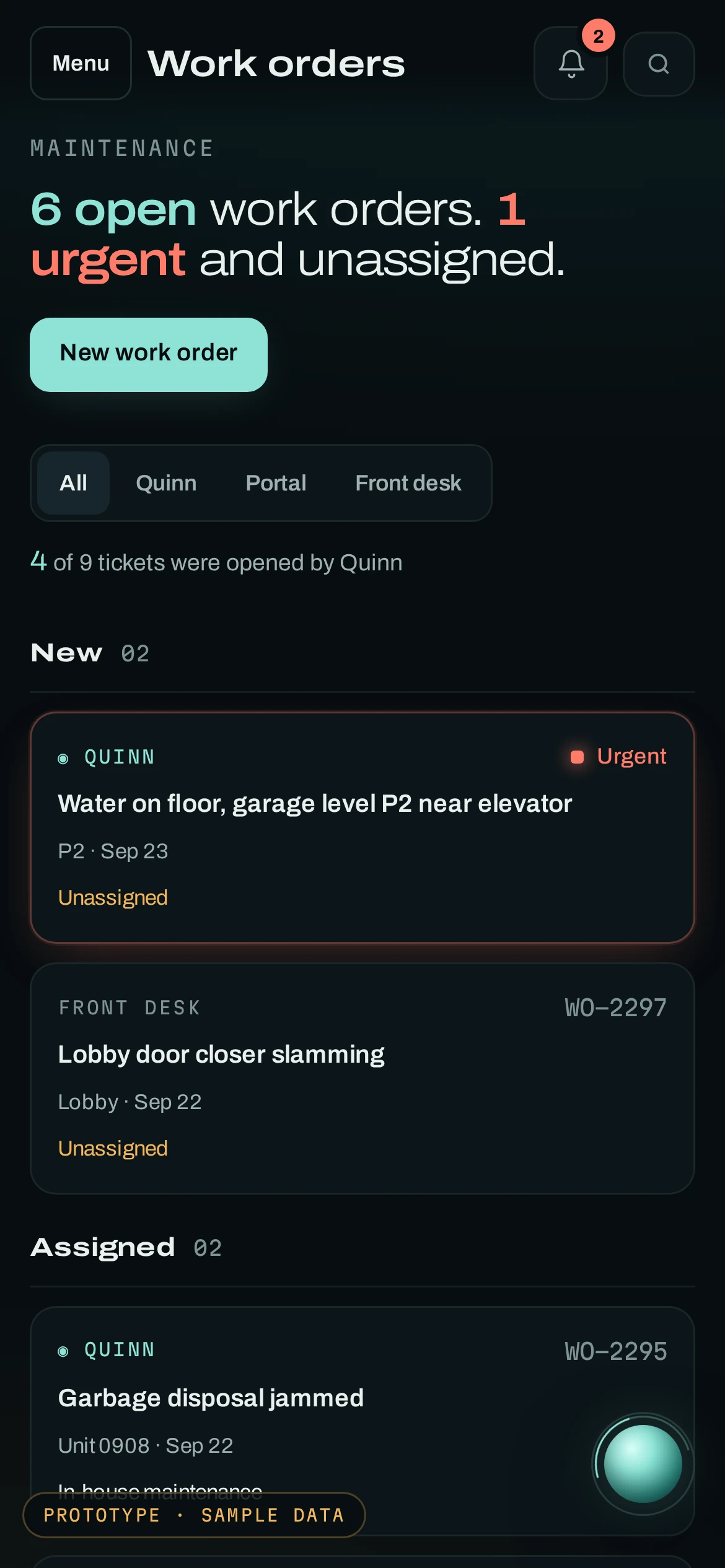
Every step, with the time and who took it.
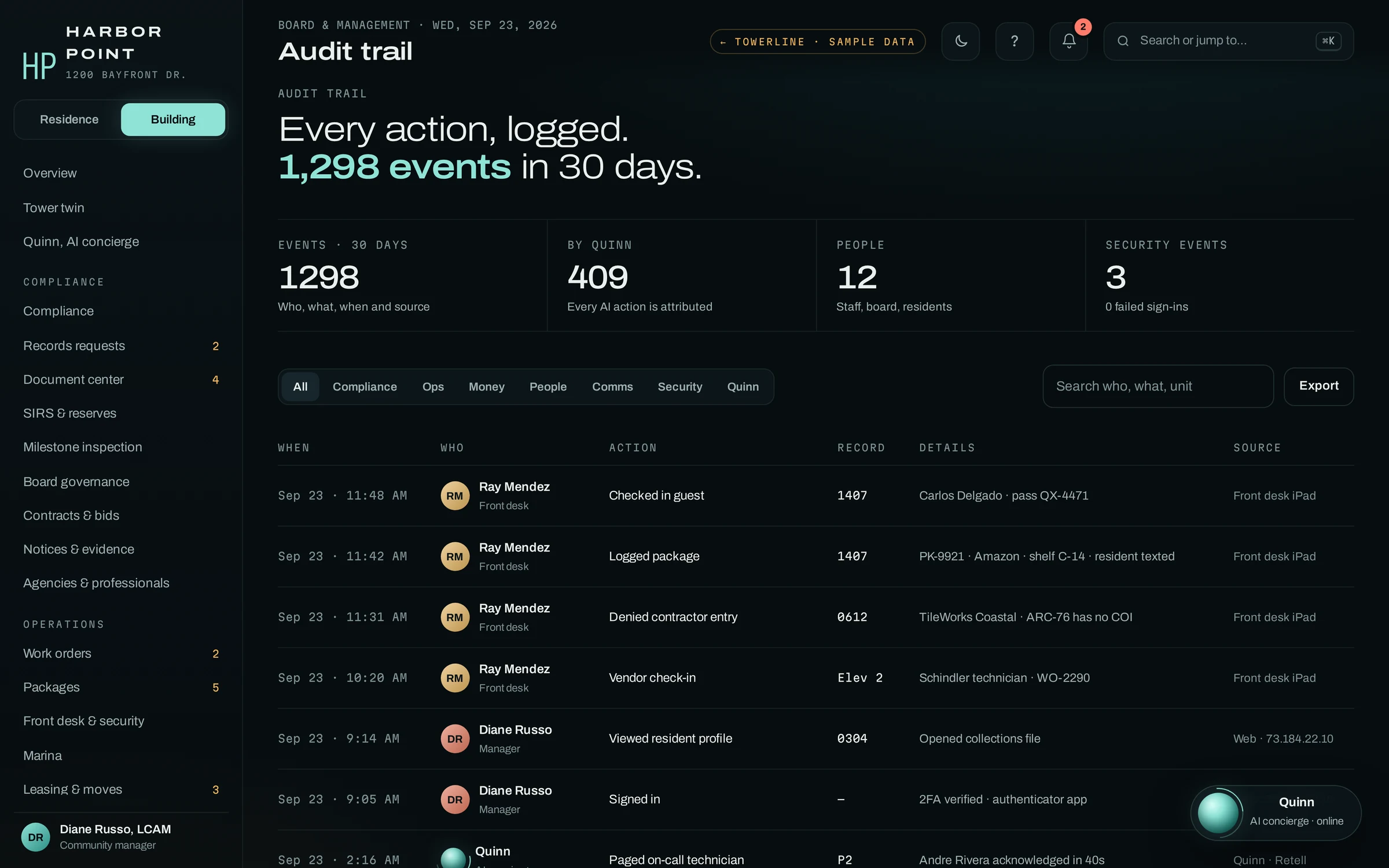
After the call we open TowerLine AI itself, the same build you can click through in the product tour. The audit trail shows the call, the work order and every update after it in one history, with the AI concierge, staff or the resident named as the source of each entry.
- Work ordersCalls, the Resident Portal and the desk feed one board
- Call logEach call keeps its transcript and outcome
- Audit trailFilter by person, source or record, then export
Get the most out of the 15 minutes
Nothing on this list is required to book. The more of it you have, the closer the call gets to a real night at one of your properties.
Who should join
- An operations lead who owns how calls reach staff
- A community manager who takes after-hours calls
- A director or board member, if the board is evaluating
Useful to bring
- Rough monthly call volume, or last month's answering-service invoice
- Your list of communities and property types
- How after-hours emergencies reach staff today
- The property management or accounting system you run
- One call that went badly, and how your team handled it
Frequently asked questions
What happens in the walkthrough?
Fifteen minutes, in the four steps above. We put the AI concierge on a live call built around the scenario you choose, then open the work order, the page, the resident update and the audit trail the call created in the Command Center. Stop us at any step to ask how it would work at one of your communities.
Is the call to the AI concierge scripted?
No. We run it on the scenario you bring and you set the pacing. Its greeting tells you it is an AI concierge.
The public demo line is not open yet, so the walkthrough is where you hear it. The scenario page has seven calls from the product’s sample call log and 18 resident prompts to choose from.
Do we need to share resident data for the demo?
No. The walkthrough runs on an example property. To make the call sound like one of your communities, tell us what you would tell a new front-desk hire: amenities, desk and gate rules, and who is on call after hours. Leave out resident names and account details.
What is in a sample plan?
A written plan for one building, from what you tell us in the form: which after-hours calls the AI concierge would take and which go to a person, who gets paged for what, which requests become work orders, and what a first deployment there would cover. It is free and needs no resident data. Choose “Get a sample plan for one building” above the form, or start one here.
How much does TowerLine AI cost?
We quote each building after scoping, and you get a firm, written number after the demo. We don't publish a price list because setup differs by property type, by the systems we connect and by what you want the AI concierge to handle. A quote combines a one-time implementation fee, a monthly fee per community and the AI concierge's phone time.
Do we have to switch from our property management or accounting system?
No. TowerLine AI runs alongside your property management or accounting system, and that system stays the system of record. TowerLine AI holds the work around it: calls, tickets, pages and notices. What moves between them, in which direction and how often is scoped during implementation for your system and plan.
We manage one building. Is a demo worth it?
Yes. The walkthrough runs the same way for one building or fifty: your scenario, a live call to the AI concierge, then the Command Center. With one building we spend less time on rollout and more on your desk and after-hours calls.