
Run TowerLine AI at one community for 60 days, then decide.
The pilot is a first deployment with a fixed scope. The AI concierge answers the community’s calls with your rules and on-call roster, calls become work orders, residents use the Resident Portal and your manager runs it all from the Command Center. We agree how success is measured before day one.
A first deployment, kept small on purpose
A first deployment covers the phone, the work that follows a call, the residents’ side and the manager’s view. That is enough to see whether the AI concierge handles your community’s calls the way your staff would.
The AI concierge on your number
The AI concierge answers the community’s line with your greeting, your house rules and your on-call roster. Emergencies page the on-call person your policy names; anything the AI concierge shouldn’t handle goes to a person, per your rules.
Work orders
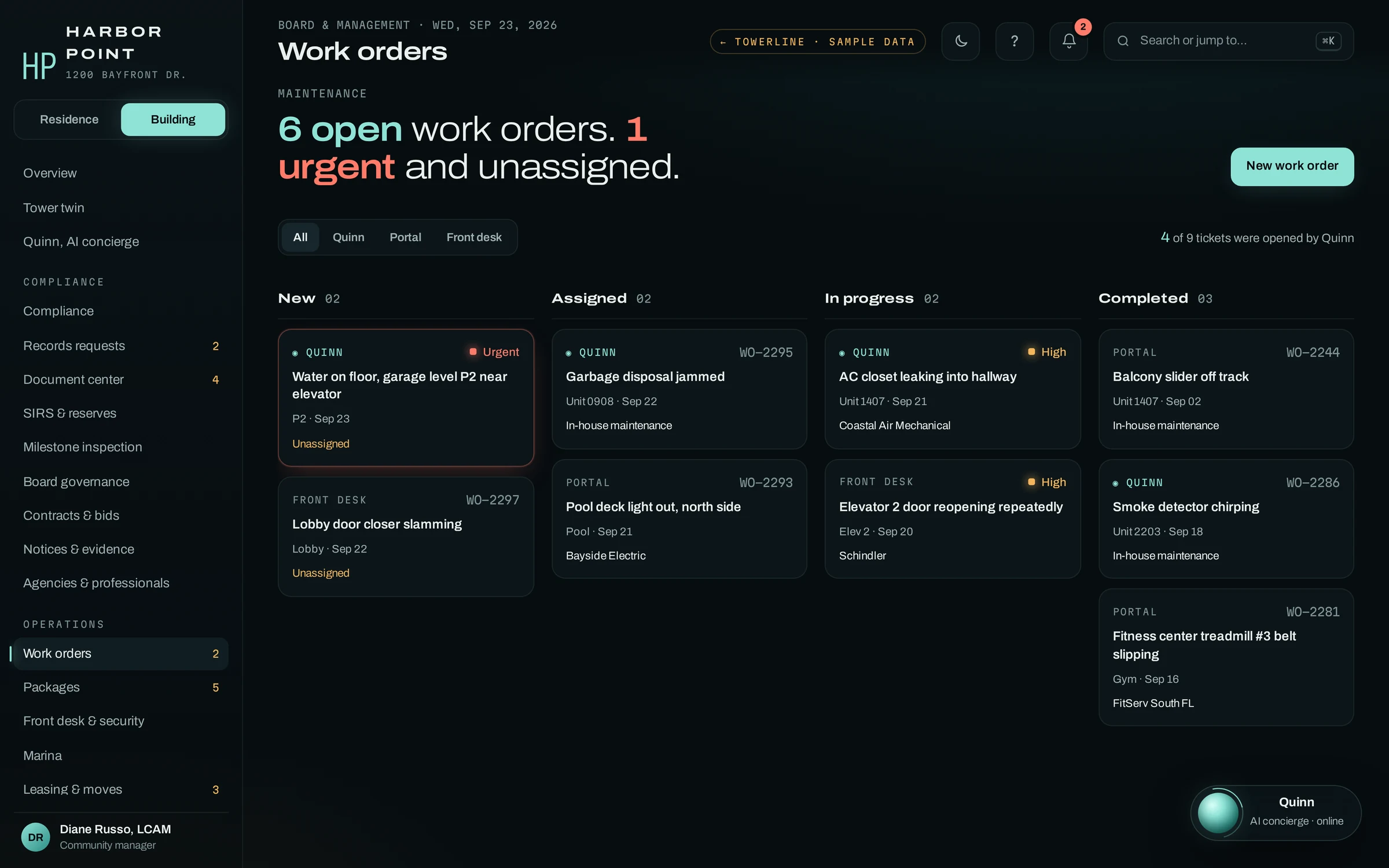
Calls become work orders with priority, location, notes and permission to enter, on the same board your maintenance staff work from. Staff assign the vendor.
The Resident Portal
Residents report a repair with photos, follow its status and read notices in the browser. Nothing to download.
The core manager dashboard
The Command Center’s overview, work order board and the AI concierge’s call log, with a transcript for every call, for the manager who runs the pilot.
Your data, imported
Residents, units and contact details come in from your system by export or CSV. A live connection to your property management or accounting system is scoped separately, if you want one.
Added after launch, scoped together
The rest of TowerLine AI stays out of the pilot. Once the first community runs the way your team wants, we scope the next modules with you, community by community.
- Board Portal: projects, approvals, votes and official records
- Florida compliance suite: records requests, notices with delivery records, SIRS and milestone tracking
- Front desk, packages and visitor logs
- Marina, leasing and moves
- Violations and architectural review
- Live connections to your other systems
Four things before day one
Discovery needs no resident account details. Most of this is what you would hand a new front-desk hire on their first day.
A community and an owner
One property to run the pilot, and a manager there who reads calls with us and decides what changes.
Your rules
Your escalation policy and on-call roster, house rules, amenity hours and the answers your staff give today.
A roster export
Residents, units and contact details as an export or CSV from the system you run. No account balances needed for the pilot.
The phone line
Someone who can forward the community’s number, or point residents to a new one, on the day the AI concierge takes calls.
Three to five measures, agreed up front
Before day one we choose the measures with you and take a baseline from your call logs or answering-service reports, where you have them. These are examples of what teams choose to measure. They are questions to answer at day 60, not results we promise.
After-hours calls answered
How many calls after the office closes reach the AI concierge and get a resolution, a ticket or a transfer, instead of voicemail.
Requests opened without staff
How many work orders are opened during the call, with no one on your team picking up the phone.
Next-morning callbacks
How many residents your staff still have to call back the next day to find out what they wanted.
Emergencies paged
For urgent building issues, the time from the call to the on-call person being paged, read from the call log.
Calls handed to a person
How often, and why, the AI concierge transfers a call or takes a message, so the rules can be tuned.
Setup, 60 days live, then a decision
The schedule for setup goes into the written scope. The 60 days start when the AI concierge takes the first resident call.
- Before day 1
Discovery and setup
We read your call logs, write the AI concierge’s scripts from your rules, import the roster and agree the measures and their baseline. Your team tests the AI concierge on its own scenarios before residents call. How long setup takes is agreed in the written scope.
- Days 1 to 60
Live at one community
The AI concierge takes the community’s calls. We read the call log with your manager and change the script, the escalation rule or the answer behind any call that went differently than your staff would have handled it.
- Day 60
Read the measures, then decide
We put the agreed measures next to the baseline with your team, and you choose the next step.
At day 60, you choose
Roll out
The next communities are scoped one at a time, each on its own rules, and quoted in writing. Modules beyond the pilot are added as you need them.
Adjust
Change the scope, the rules or the measures, and keep going at the same community on terms we agree.
Stop
We switch the AI concierge off and your calls go back to where they went before. You get an export of the pilot’s records in a format agreed in the written scope.
Quoted after discovery
The pilot has a fixed scope, so it gets a fixed, written quote before anything starts. There is no price list: the number depends on the community, the rules the AI concierge follows there and how calls reach it today. The quote follows the same structure as every TowerLine AI engagement.
How pricing is scopedQuestions about the pilot
How much does the pilot cost?
It is quoted after discovery, in writing, before anything starts. The scope is fixed, so the quote is too. We don’t publish prices because the setup depends on the community, its rules and what the AI concierge handles there. The quote follows the same structure as every TowerLine AI engagement.
Can we pilot at more than one community?
The pilot runs at one community, so the call log stays small enough to read together and every change can be traced to a call. The others follow once the first runs the way your team wants, and each one reuses the roles and policy templates that worked at the pilot community.
Do we have to replace our property management or accounting system?
No. That system stays the system of record. For the pilot, residents and units come in by export or CSV, so the AI concierge can recognize callers by the number on file. A live connection to your system is scoped separately, after the pilot.
What happens to our answering service during the pilot?
Your current service can stay in place until the day the AI concierge takes the line. You choose which calls move, and when: a pilot can start with nights and weekends only, while daytime calls keep ringing the office or the service.
Are the measures a guarantee?
No. They are the questions we agree to answer with your own call log at day 60. We set them with you before day one so the decision at the end is based on numbers you chose, from your community.
Pick the community. We scope the rest.
Start with a 15-minute demo, or send us one building and get a written plan back first. Either way, the pilot is quoted after discovery.