
AI concierge vs. front desk staff: what each one covers
Choose staff alone if your desk is covered around the clock and the phone rarely pulls anyone away from the lobby. Choose TowerLine AI alongside your staff if calls pile up overnight or while the desk is busy: the AI concierge takes the phone, and staff keep IDs, packages and the lobby.
A staffed front desk does two jobs at once: it serves the people in the lobby and it answers the phone. An AI concierge can take the second job. The first one stays with people, and this page is specific about where the line falls.
Who handles each front desk task in a shared setup
Ten ordinary desk tasks and who takes each one when a building runs staff and TowerLine AI’s concierge together.
| Desk task | Who handles it | How it works |
|---|---|---|
| Greeting residents and guests in the lobby | Front desk staff | It needs someone in the room. |
| Checking photo ID before a guest goes up | Front desk staff | By phone, the AI concierge can match a guest pass code and send the visitor to the desk. Staff confirm entry in person. |
| Signing for and handing over packages | Front desk staff | The AI concierge can check the package log when a resident calls to ask what is waiting. |
| A contractor without an insurance certificate | Front desk staff | The desk keeps the contractor downstairs. The hold shows on the unit’s record until management signs off. |
| A fall, a fire alarm or a fight in the lobby | Front desk staff and 911 | Callers reporting a fire, medical or police emergency are told to hang up and call 911. |
| The phone ringing while the desk serves someone | AI concierge | The AI concierge takes the call instead of putting the person at the desk on hold. |
| Overnight calls with one person on the desk | AI concierge | The overnight staffer stays with the building while the AI concierge answers. |
| Water in a corridor, reported by phone | Both | Staff head upstairs with towels. On the phone, the AI concierge files the urgent ticket and pages engineering. |
| Freight elevator and amenity bookings | AI concierge | Booked under your rules by phone, and visible on the calendar the desk works from. |
| A resident upset about a neighbor or a charge | Front desk staff | The AI concierge routes it to a person per your rules; callers can ask for a person at any time. |
Work that needs a person at the desk
The lobby itself
Someone who sees who walks in, knows residents by name and notices what is out of place. Software on a phone line does none of that.
Identity in person
The AI concierge can match a guest pass code. Letting someone into the building stays with a person who checks ID.
Hands-on work
Packages on the shelf, keys and fobs, the freight elevator pads, a contractor walked to a unit.
Judgment in the room
A resident in distress, a dispute at the desk, an emergency in the building before help arrives.
Desk work the AI concierge can take on by phone
Calls while the desk is busy
When two people are at the desk and the phone rings, the AI concierge answers. Staff finish with the person in front of them.
Calls overnight and on weekends
With one person on an overnight shift, the AI concierge takes the line so that person can stay with the building.
Requests that end in an action
Repairs become work orders during the call, with permission to enter. Package questions, guest passes and amenity bookings are handled by lookup.
Calls in other languages
The AI concierge answers in the caller’s language, multilingual including English and Spanish, whoever is on shift.
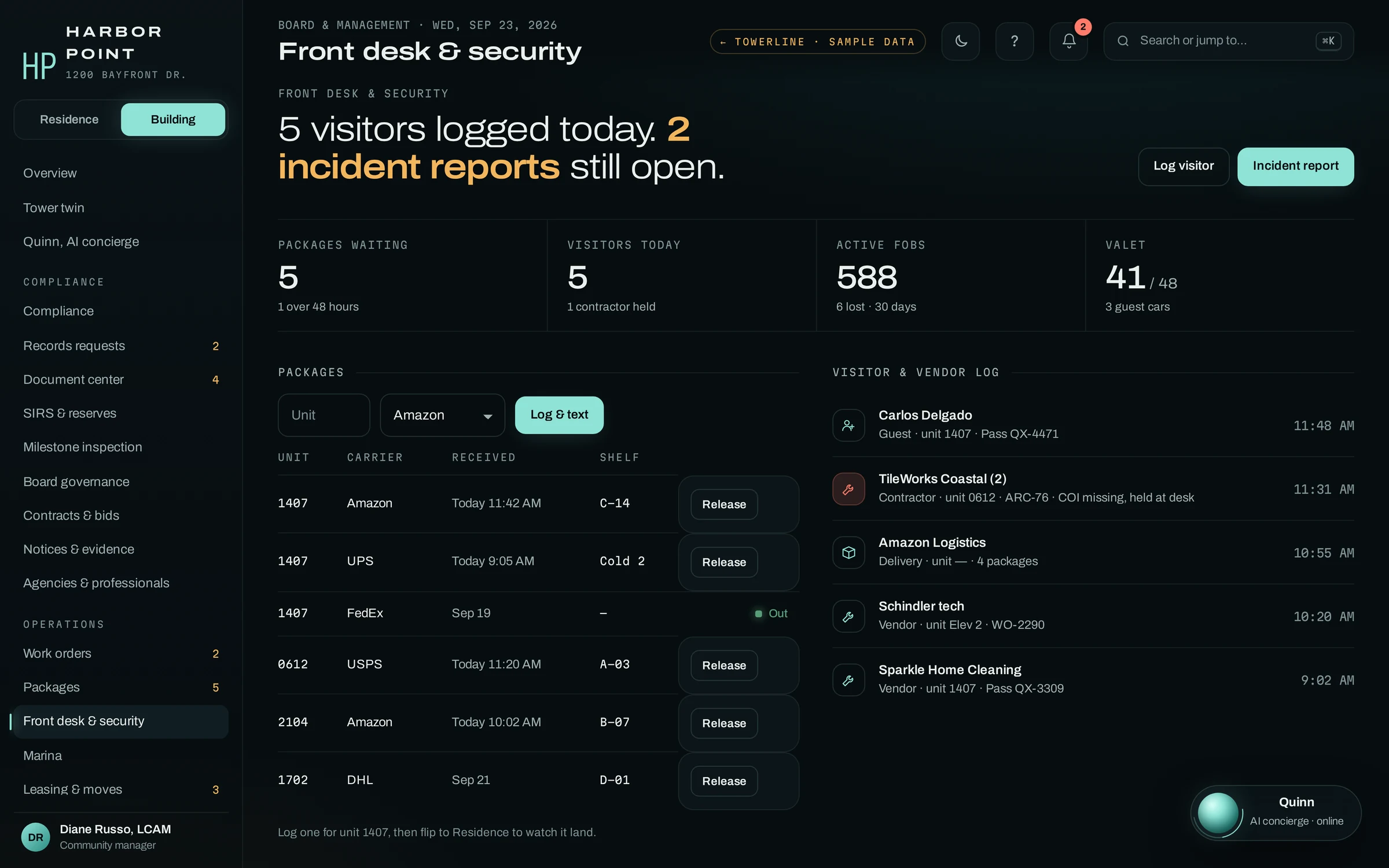
The desk and the AI concierge write to the same log
Whatever the AI concierge does on a call lands where the desk already works: a work order on maintenance’s board, a booking on the desk’s calendar, a note on the unit. The visitor and vendor log, the package shelf and incident reports sit beside it.
The overnight staffer starts the shift knowing what came in by phone, and the morning shift sees both.
Four questions to answer before adding an AI concierge to a staffed desk
None of these need software to answer. They decide whether an AI concierge would help your desk at all.
Count the desk’s calls
For one week, tally calls by hour and by what the caller wanted. Note the calls that came in while someone was standing at the desk.
Mark what needs a person
Go through the tally and mark every call that needed someone in the building or a judgment call. Those stay with staff.
Write the rules down
House rules, guest and contractor procedures, who is paged for what. The AI concierge works from what you approve, so gaps show up fast.
Decide who sees what
Desk, management, maintenance and the board each see their part of the same record. Roles are set per person and confirmed during setup.
When staff alone is enough, and when to add the AI concierge
Some desks do not need an AI concierge. Be honest about which kind yours is.
Staff alone is enough if
- The desk is covered by two people at busy hours
- Overnight calls are rare and someone is always on
- Your staff speak the languages your residents call in
- Calls rarely interrupt someone standing at the desk
Add the AI concierge if
- The phone rings while staff serve people in the lobby
- One person covers the desk overnight
- Residents call in languages your shift does not speak
- Calls should become work orders without retyping
Frequently asked questions
Will an AI concierge replace our front desk staff?
It is not designed to. The AI concierge takes the phone: overflow while the desk is busy, overnight calls and requests that end in a lookup or a work order. Greeting residents, checking IDs, handling packages and responding in the lobby stay with your staff. Staffing decisions are yours, and we make no claim about headcount.
Can the AI concierge let a guest or vendor into the building?
No. It can match a guest pass code a resident added and tell the visitor to show photo ID at the desk. Staff confirm entry in person. It does not share gate or door codes.
How does the desk see what the AI concierge did?
Every call is transcribed and attached to the building’s record with a summary. Work orders it opens appear on the same board as requests from the desk and the Resident Portal, tagged with their source, so the next shift sees what came in overnight.
Can staff take a call themselves when they are free?
Yes. How calls are split between the desk and the AI concierge can be set per building during setup. For example, the desk answers first during the day and the AI concierge picks up when the desk does not, overnight and on weekends.
Does TowerLine AI have the desk’s logs too?
Yes. Packages with pickup codes and text and email notices, a visitor and vendor log, incident reports and contractor holds are part of the Command Center, on the same record the AI concierge writes to.

Bring a shift at your desk. We’ll show which calls the AI concierge takes.
A 15-minute walkthrough on your building: the overnight shift, the busy hour at the desk, the calls your staff would rather not miss.